

Welcome to ThreoAI
Welcome to ThreoAI - your organization's secure AI chat platform. Learn what ThreoAI is, how to get access, what you can do with it, and where to go next.
Overview
Section titled “Overview”ThreoAI is your organization’s secure AI chat platform, at https://threo.synthreo.ai. You chat with leading AI models, but your organization runs the show: which models are on, who gets in, and how your data is handled all sit with your administrator, not with a consumer vendor.
So you get modern AI in an environment your IT and security teams have already approved. Same power, no surprises.
What you can do with ThreoAI
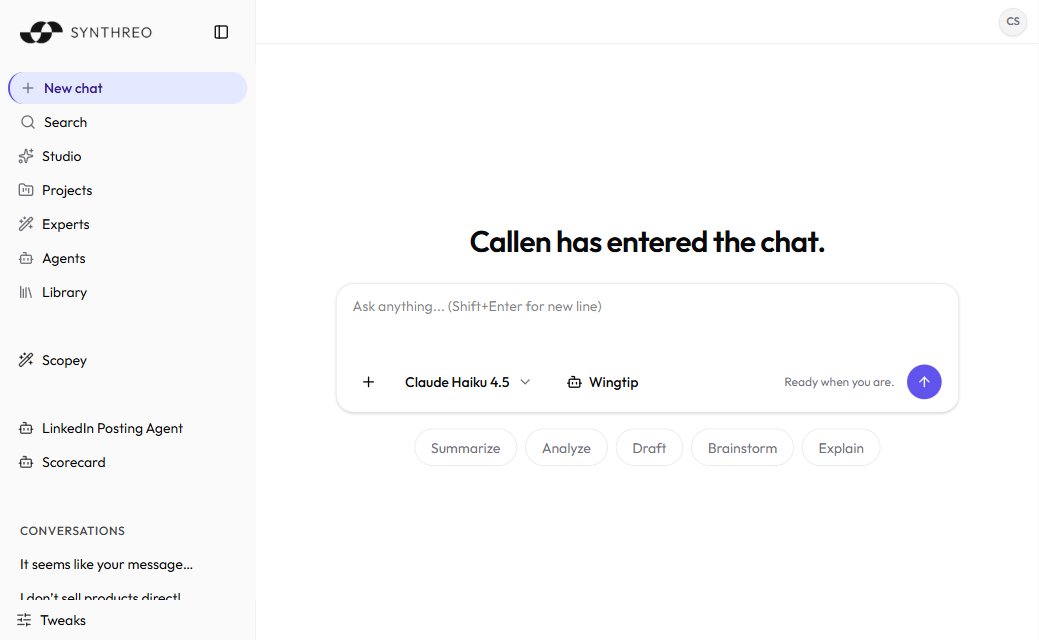
Section titled “What you can do with ThreoAI”ThreoAI is more than a chat box. The home screen greets you by name (the wording rotates - “Hey Sam!”, “Welcome back, Sam.”, and a few others), and a model selector lets you pick from the AI models your administrator has turned on. From there you can:
- Chat with many models. Ask questions, draft content, brainstorm, get code, translate text. Choose the model before you send your first message - the selector locks once the conversation has messages, so start a new chat to switch.
- Attach files. Drop in PDFs, Word, Excel and PowerPoint files, text and Markdown, CSV data, images, source code, and ZIP bundles - roughly 120 file extensions in all. The AI reads them, pulls out data, and answers questions about them. See Working with Files.
- Use Experts. An Expert is a reusable assistant someone set up for a specific job - contract review, HR policy, onboarding. Open one and it follows the instructions and knowledge its creator gave it. See Using an Expert.
- Run Agents. Agents are Pylon agents surfaced in chat - they run multi-step workflows and tools on your behalf. See Welcome to Pylon.
- Build in Studio. Studio is the creation hub. It is where you make Experts, Connectors, and Projects. See Studio Overview.
- Connect external systems. Connectors bring tools like calendars, ticketing, and internal APIs into chat through MCP. See Connectors.
- Group work into Projects. A Project ties related conversations and shared context together, so a thread of work has memory across chats. See ThreoAI Projects.
- Compare models side by side. Send one prompt to two models and read both answers, and add up to two more panels if you want a wider read. See AI Model Comparison.
Getting access
Section titled “Getting access”You do not sign yourself up. Your administrator provisions your access in the Canopy portal, and you get an invitation email to finish setup.
- Your administrator adds you as a user in Canopy.
- You receive an email from noreply@synthreo.ai with the subject [Synthreo] Access granted.
- The email has a Complete Account Setup button. Select it to open the setup page, where you set a password, pick a two-factor authentication method, and accept the terms and privacy policy. If your account does not already have a name on file, you fill in your first and last name here too.
- Once your account is active, go to https://threo.synthreo.ai and log in.
The invitation link expires in 7 days. No email? Check spam first, then ask your administrator to resend it.
For the full first-time walkthrough, see Logging In.
The desktop app
Section titled “The desktop app”ThreoAI has a native desktop app, Synthreo Wingtip, for the ThreoAI workspace and the Wingtip agent. It runs on macOS and Windows.
To download it, open the account menu (your avatar, top-right). The download entry offers the installer that matches your operating system - Download for macOS or Download for Windows. Install it, then sign in with the same credentials you use in the browser. The download rows are hidden inside the desktop app itself, since you are already running it.
Where to start
Section titled “Where to start”New to ThreoAI? Work through these in order:
- Log in and set up your account - accept the invitation, set a password, activate your account.
- Set up MFA - pick your two-factor authentication method. Choosing a method is part of account setup, and which methods you are offered is set by your organization.
- Tour the interface - learn the sidebar, the composer, and the account menu.
- Start your first chat - send a message, pick a model, try file attachments.
Once you are comfortable, you might also:
- Update your Profile - set your preferred name, describe your role, and tune memory so answers fit you.
- Use a shared Expert - open Experts your organization has shared with you.
- Create an Expert - build your own assistant with instructions and a knowledge base.
Need help?
Section titled “Need help?”- Select the ? Help icon in the top-right corner of the header to open the ThreoAI documentation in a new tab.
- Use Report a bug in the account menu (your avatar, top-right) to send in an issue.
- Ask your administrator or MSP help desk for anything the bug report form does not cover. They escalate to Synthreo through the partner support channel.
- Contact your administrator for account access, model requests, or anything specific to your organization’s setup.
Explore the full Synthreo platform
Section titled “Explore the full Synthreo platform”ThreoAI is one part of the Synthreo platform. Depending on your role, you may have access to the rest:
- Welcome to Pylon - the no-code platform for AI agents and workflow automation. A Pylon Agent backs each Action you wire onto an Expert, so an assistant can reach into ticketing, CRM, and email systems.
- Canopy Overview - where administrators manage users, customers, AI model configuration, and permissions.
- Creating an Expert - build a specialized assistant with custom instructions, training documents, prompt starters, and Pylon-backed actions.