

Canopy Dashboard
The Canopy Dashboard is the admin landing screen: a rolling 30-day snapshot of your organization with KPI cards, recent users, and customer-health signals.
Overview
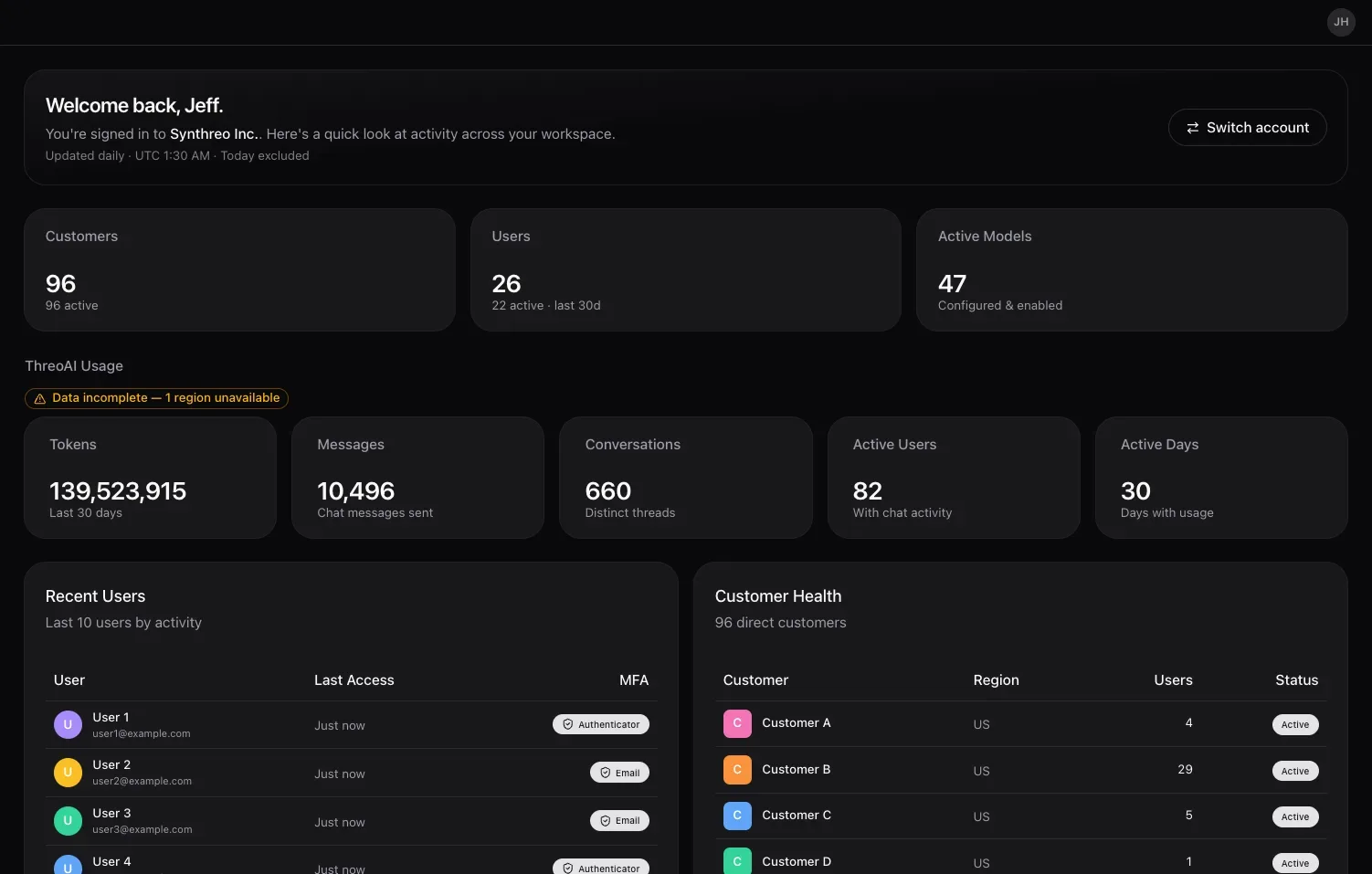
Section titled “Overview”The Dashboard is the screen you land on when you sign in to Canopy. It opens at /home and gives you a 30-day snapshot of your organization: how many customers and users you have, which models are in use, who has been active recently, and which child tenants need attention.
Everything on the Dashboard reflects the trailing 30 days unless a card says otherwise, so it is the fastest way to see the current state of your organization before you drill into a specific area.
The window is fixed at 30 days here. Period and per-customer scoping live on Analytics instead.
Each card loads on its own, so the page fills in progressively rather than waiting for the slowest query. A card showing -- is still loading, not empty.
KPI cards
Section titled “KPI cards”The top of the Dashboard is a row of KPI cards. Each card is one headline metric for the last 30 days.
| Card | What it shows | Sub-label |
|---|---|---|
| Customers | The number of direct child customer tenants under your organization | how many are active |
| Users | The number of user accounts across your organization | how many were active in the last 30 days |
| Active Models | The number of models configured and enabled for your organization | ”Configured & enabled” |
On the Customers and Users cards, the headline number is the total and the smaller line beneath it is the active subset - reading only the headline overstates how much of your book is actually in use. The Active Models sub-label instead restates what the headline counts: models both configured and enabled.
Use the cards as a pulse check. A sudden change, such as a drop in active users or a jump in customers, is your cue to open the matching section for detail.
ThreoAI usage
Section titled “ThreoAI usage”Below the KPI cards, the ThreoAI Usage panel summarizes chat activity across your organization for the last 30 days:
| Metric | What it shows |
|---|---|
| Tokens | Total tokens used across all conversations |
| Messages | Chat messages sent |
| Conversations | Distinct conversation threads |
| Active Users | Users with chat activity |
| Active Days | Days with any usage |
If a region’s data cannot be reached, the panel notes it (for example, “Data incomplete - 1 region unavailable”), so you know a metric may be understated.
Recent users
Section titled “Recent users”The Recent Users card shows the five most recently active users, each with their last access time and MFA method. It is a quick entry point into User Management: select a user to open their detail page, where you can review their permissions, resend an invitation, or change their role.
It is a shortcut, not a roster. For the full list, open User Management.
Customer health
Section titled “Customer health”The Customer Health table lists up to five of your child customer tenants alongside the signals that tell you which ones need attention. Each row is one customer, showing its region, user count, and status. The card’s caption gives your total number of direct customers, so you can see when the list is a sample rather than the whole book.
Select a customer to jump to its detail page in Customers, where you can review its users, features, and settings. For the deeper usage and adoption metrics behind these signals, open Analytics.
Switch into a customer
Section titled “Switch into a customer”The welcome strip at the top of the Dashboard holds an account switcher: a one-click way to step into a child customer’s environment without going through the Customers list first. It offers your whole accessible subtree, at any depth, not just your direct children.
Quick actions
Section titled “Quick actions”A Quick actions grid gives one-click links into the areas you use most: Customers, User Management, Analytics, and Settings.
Frequently Asked Questions
Section titled “Frequently Asked Questions”What period does the Dashboard cover? The Dashboard summarizes the trailing 30 days. KPI cards and recent-activity lists reflect that rolling window unless a card states otherwise.
What does Active Models show? Active Models shows how many models are configured and enabled for your organization. It is a count of enabled models, not a usage metric.
Can customers see my Dashboard? No. The Dashboard is administrator-only inside Canopy. Child customers never see your organization’s Dashboard, KPIs, or customer-health data.
Related
Section titled “Related”- Canopy Analytics - usage and adoption KPIs in depth
- Adding a New Customer - create and manage child customer tenants
- Sharing - decide who can use which agents and sensitive data
- Canopy Overview - the admin portal at a glance