

Submit a Bug Report
How to submit a ThreoAI bug report — capture browser console logs and HAR network traces to give the Synthreo support team the diagnostic data needed to resolve your issue.
Please include your browser Console log and HAR (Network) file so we can diagnose the issue.
Important: Keep the Developer Tools open while you reproduce the issue. Network HAR data only records while the tools are open.
🖥️ Collect the Console log
Section titled “🖥️ Collect the Console log”Chrome / Edge (Windows, macOS)
Section titled “Chrome / Edge (Windows, macOS)”- Open the page where the issue occurs.
- Open Developer Tools
- Windows/Linux:
F12orCtrl+Shift+I - macOS:
⌥⌘I(Option+Command+I) orF12
- Windows/Linux:
- Go to the Console tab.
- Reproduce the issue with DevTools open.
- In the Console panel, right-click inside the messages list and choose Save as… (Chrome/Edge) or Save all messages to file (Firefox).
- Save as
console-log.txt.
Firefox
Section titled “Firefox”- Open the page.
- Open Developer Tools (
F12orCtrl+Shift+I/⌥⌘I). - Go to Console.
- Reproduce the issue.
- Right-click inside the messages list → Save all messages to file.
- Save as
console-log.txt.

🌐 Collect the HAR (Network) file
Section titled “🌐 Collect the HAR (Network) file”Chrome / Edge (Windows, macOS)
Section titled “Chrome / Edge (Windows, macOS)”- With the page open, open Developer Tools (
F12orCtrl+Shift+I/⌥⌘I). - Go to the Network tab.
- Reproduce the issue.
- Right-click in the requests list and select Save all as HAR with content, or click the Export button if visible.

- Save as
network.har.
Firefox
Section titled “Firefox”- Open Developer Tools (
F12). - Go to Network.
- Reproduce the issue.
- Right-click in the requests list → Save all as HAR.

- Save as
network.har.
🪟 Location of Developer Tools
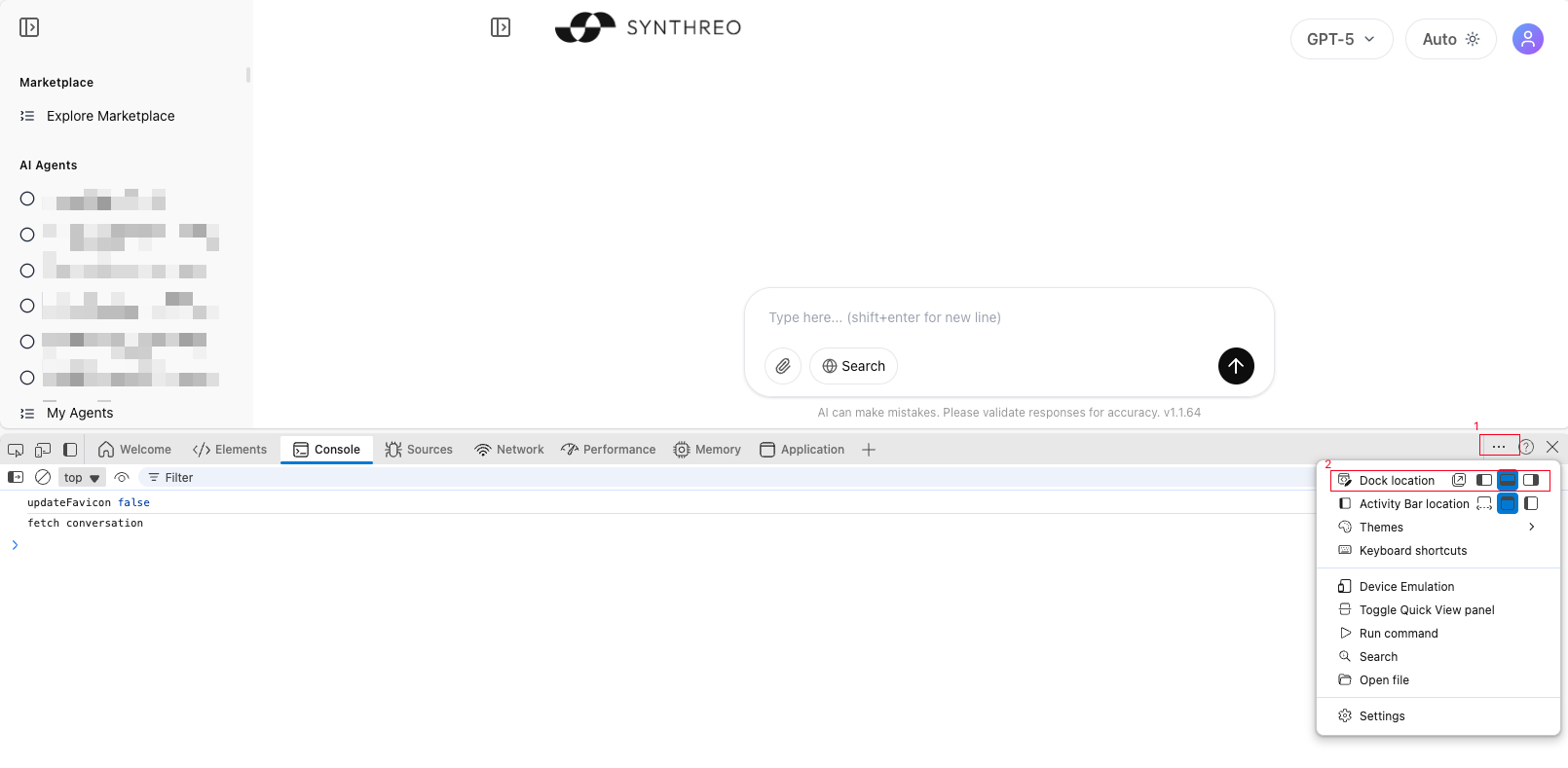
Section titled “🪟 Location of Developer Tools”- Depending on your browser, Developer Tools may open at the bottom, on the right, or in a separate window.
- You can change this location by clicking the three-dot menu in the Developer Tools toolbar and selecting Dock side.
- This does not affect functionality — choose whichever layout is most convenient for you.
📎 Attach and send
Section titled “📎 Attach and send”- Attach
console-log.txtandnetwork.harto your ticket. - You can zip the files if they are large or if your email blocks
.harfiles. - Email them to help@synthreo.ai or attach them directly to your support ticket.
- Adding screenshots and clear steps to reproduce/how you encountered the error in the ticket will help us resolve the issue faster.
🔒 Privacy and security
Section titled “🔒 Privacy and security”HAR files and console logs can include sensitive data such as session tokens, request headers, and payloads. We use these files only to investigate your issue and handle them securely. Do not share these files publicly. Send them only to help@synthreo.ai.